RestMSSQL: Turn Any SQL Server Database into a REST API with One Command
I've lost count of how many times I've done this dance: open Visual Studio, create a new Web API project, write the models, scaffold controllers, wire up Swagger, configure CORS, add pagination logic... and three hours later I still haven't written a single line of actual business logic.
Last month I needed a quick API for an internal tool. The database already existed. The schema was fine. I just needed endpoints. And I caught myself doing the whole ceremony again.
That was the last time.
I spent a weekend building RestMSSQL -- and honestly, I wish I'd done it sooner.
So what does it actually do?
You give it a SQL Server connection. It reads the schema -- tables, views, stored procedures, foreign keys, the whole thing -- and spins up a REST API. Full OData support. Swagger UI included. Done.
One command:
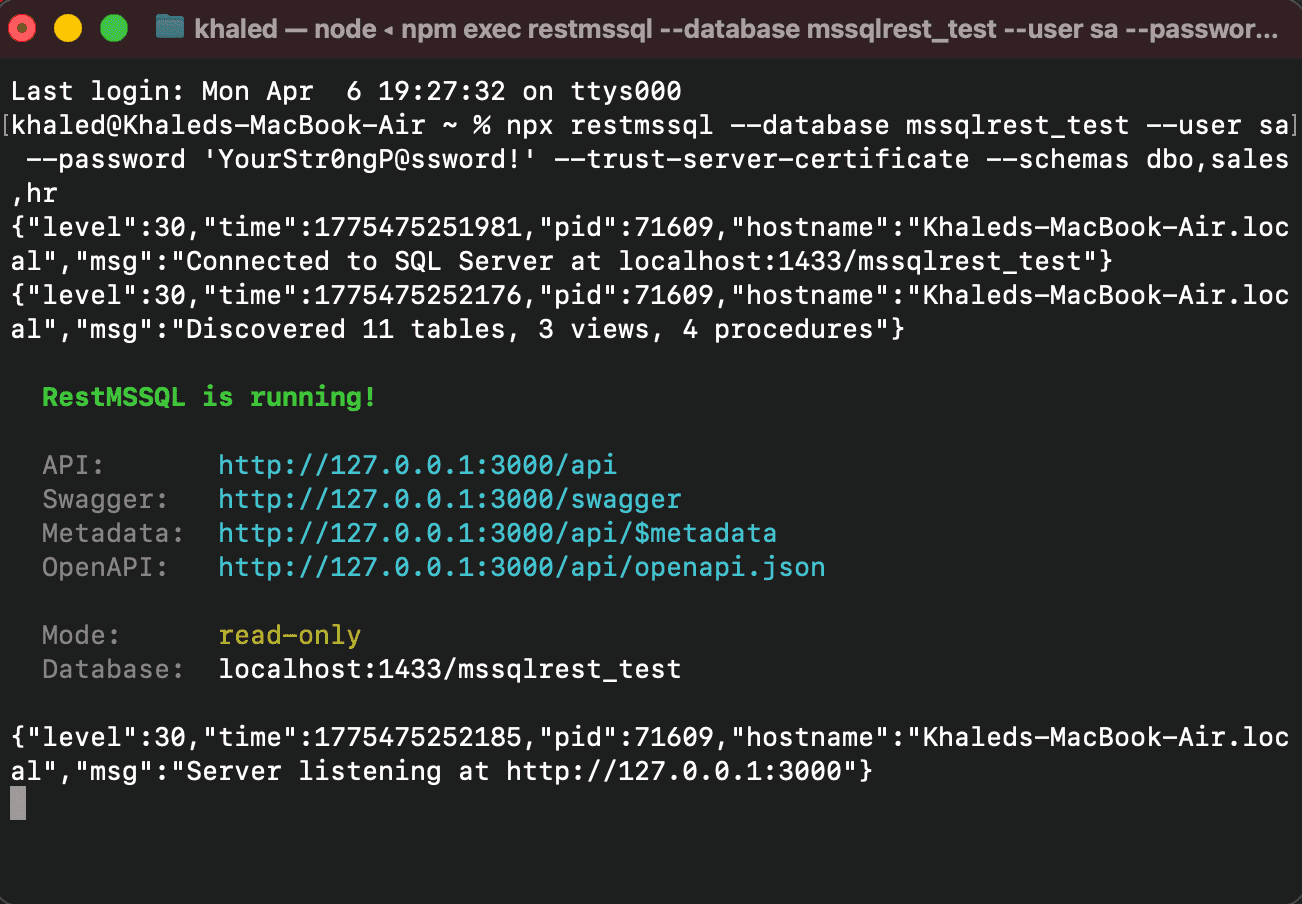
npx restmssql --database mydb --user sa --password "YourP@ssword" --trust-server-certificate
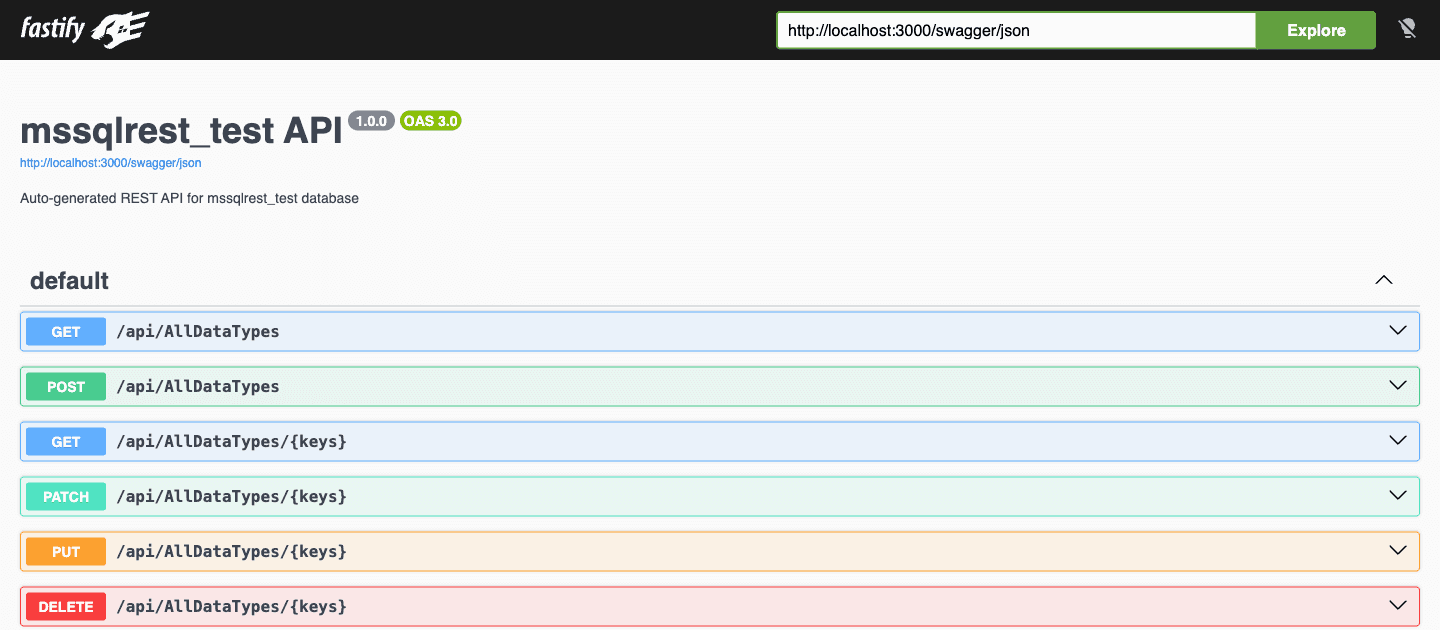
That's not a simplified example. That's the whole thing. Your API shows up at http://localhost:3000/api and Swagger at http://localhost:3000/swagger.
Why did I build this?
Every SQL Server project I've worked on eventually needed a REST API layer. And every time, I'd look for something lightweight that just works -- point at a database, get endpoints. The options were either heavy enterprise tools or building it from scratch. Nothing I could just npx and be done with.
These were the situations that kept bugging me:
- A frontend team needed data endpoints and the backend wasn't ready. They were blocked for days
- We had a 15-year-old medical data database that needed a REST layer. Nobody wanted to reverse-engineer those stored procedures into C# models
- I kept building throwaway admin dashboards and spending more time on the API than the actual UI
- During debugging, I wanted to poke around database tables without opening SSMS and writing SELECT statements
For all of these, a full backend project felt like using a sledgehammer to hang a picture frame.
Getting started
Two ways to go:
Just run it (nothing to install):
npx restmssql --database mydb --user sa --password "YourP@ssword" --trust-server-certificate
Or install globally if you'll use it often:
npm install -g restmssql
restmssql --database mydb --user sa --password "YourP@ssword" --trust-server-certificate
No project scaffolding. No npm init. No config files to create. You need Node.js 20+ and a SQL Server to point at.
What shows up
Once RestMSSQL connects, it reads your database and creates routes for everything it finds:
| Method | URL | What it does |
|---|---|---|
| GET | /api |
Lists all available resources |
| GET | /api/<Table> |
Query rows (with OData) |
| GET | /api/<Table>/:id |
Fetch one row by primary key |
| POST | /api/<Table> |
Insert a row (needs --no-readonly) |
| PATCH | /api/<Table>/:id |
Partial update (needs --no-readonly) |
| PUT | /api/<Table>/:id |
Full replace (needs --no-readonly) |
| DELETE | /api/<Table>/:id |
Delete (needs --no-readonly) |
| POST | /rpc/<Procedure> |
Run a stored procedure |
| GET | /swagger |
Interactive API docs |
If you have multiple schemas, they show up as dotted paths: /api/sales.Orders, /api/hr.Employees. No extra config needed.
Or use a connection string:
restmssql --connection "Server=localhost;Database=mydb;User Id=sa;Password=YourP@ssword;TrustServerCertificate=true"
The OData part is where it gets interesting
This isn't a dumb table dump. You get real query power without writing any SQL.
Filter rows:
GET /api/Products?$filter=Price gt 100 and InStock eq true
Pick columns:
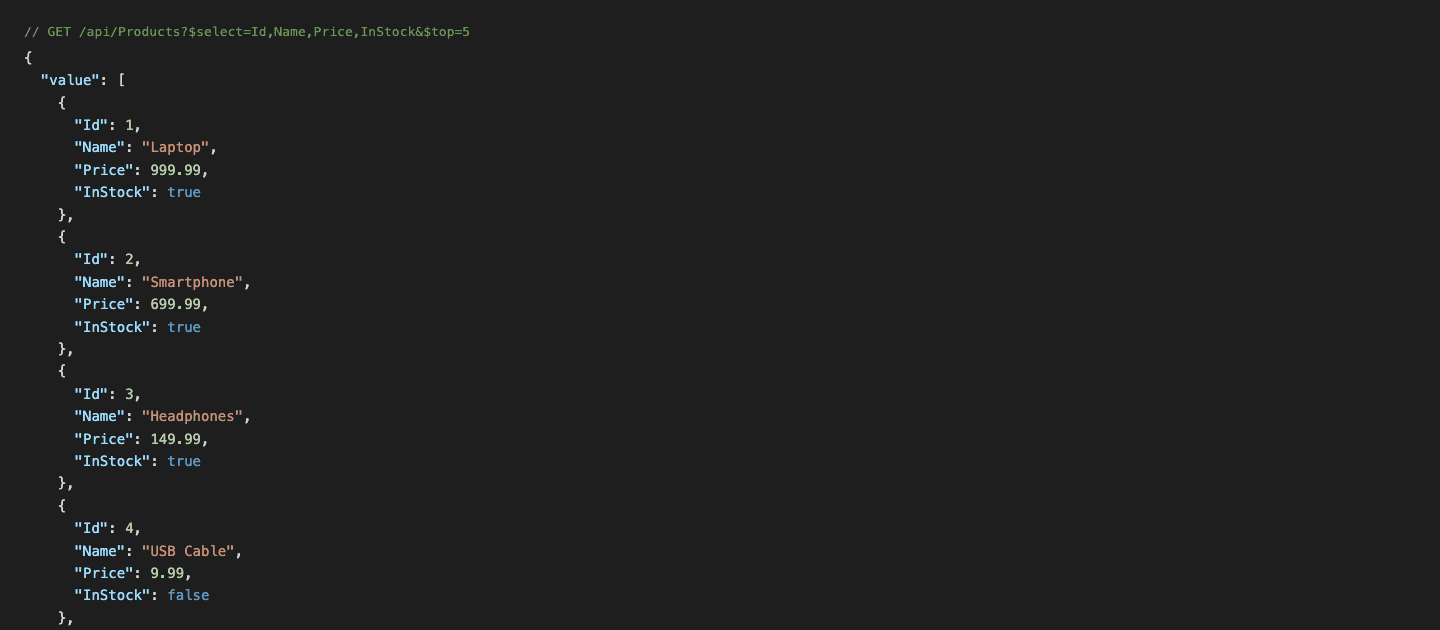
GET /api/Products?$select=Name,Price
And here's a real response from it:
Sort and paginate:
GET /api/Products?$orderby=Price desc&$top=10&$skip=20
Pull in related data:
GET /api/Products?$expand=Categories($select=Name)
GET /api/Orders?$expand=OrderItems($top=5;$orderby=UnitPrice desc)
It picks up foreign keys from the schema and wires up the relationships automatically. I didn't have to configure a single navigation property.
Search with string functions:
GET /api/Products?$filter=contains(Name,'phone')
GET /api/Products?$filter=startswith(Name,'Lap')
GET /api/Products?$filter=tolower(Name) eq 'laptop'
Count results:
GET /api/Products?$count=true
Or throw everything together:
GET /api/Products?$filter=contains(Name,'phone')&$select=Name,Price&$orderby=Price desc&$top=5
Stored procedures work too
If your database has stored procedures, they're available under /rpc/:
POST /rpc/GetProductsByCategory
Content-Type: application/json

{"CategoryId": 1}
Multi-schema procs are fine: /rpc/hr.GetEmployeesByDepartment, /rpc/sales.GetOrdersByStatus.
JSON or XML
JSON is the default. But if you need XML (I won't ask why), flip the Accept header:
curl -H "Accept: application/json" http://localhost:3000/api/Products
curl -H "Accept: application/xml" http://localhost:3000/api/Products
It's read-only by default
This was a deliberate choice. The first time you run RestMSSQL, it only allows GET requests. No writes, no deletes, no "oops I dropped the customers table" moments.
If you actually want write access:
restmssql --database mydb --user sa --password "YourP@ssword" --no-readonly
You have to opt into that. I've seen enough production incidents to know that "read-only by default" isn't paranoia -- it's pattern recognition.
Configuration options
There are three ways to configure it. They override each other in this order: CLI flags > env vars > config file > defaults.
CLI flags (full control):
restmssql \
  --host localhost \
  --database mydb \
  --user sa \
  --password "YourP@ssword" \
  --server-port 8080 \
  --schemas dbo,sales,hr \
  --exclude-tables AuditLog,TempData \
  --default-page-size 50 \
  --max-page-size 500 \
  --log-level debug \
  --no-readonly \
  --listen-host 0.0.0.0
Environment variables (good for Docker/CI):
MSSQLREST_HOST=localhost
MSSQLREST_DATABASE=mydb
MSSQLREST_USER=sa
MSSQLREST_PASSWORD=secret
MSSQLREST_SERVER_PORT=3000
MSSQLREST_READONLY=false
MSSQLREST_SCHEMAS=dbo,sales
Config file (.mssqlrestrc.json):
{
  "host": "localhost",
  "database": "mydb",
  "user": "sa",
  "schemas": ["dbo", "sales"],
  "readonly": true
}
Multiple schemas? Already handled
restmssql --database mydb --user sa --password "YourP@ssword" --schemas dbo,sales,hr
Each schema gets namespaced endpoints:
/api/Products(dbo)/api/sales.Orders/api/sales.Customers/api/hr.Employees/api/hr.Departments
I took security seriously
I didn't want to build something that turns every SQL Server into an open bar. A few things I baked in from day one:
- All queries are parameterized. SQL injection isn't a thing here.
- Table and column names get validated against the actual schema before they hit a query. Then they get bracket-quoted. You can't sneak in a column name that doesn't exist.
- LIKE wildcards get escaped. Someone will try
%in a filter. I've met those people. - Pagination is mandatory. You can't accidentally pull 10 million rows in one request. Default is 100, max is 1000 (both configurable).
- Rate limiting is built in. No extra middleware needed.
- Read-only by default. Already mentioned it, but it's worth repeating.
- CORS is on by default but configurable. Disable it with
--no-corsif you know what you're doing.
How it works inside
Request -> Content Negotiation -> OData Parser -> Query Builder -> SQL Server
                                                                       |
Response <- JSON/XML Formatter <- ----------------------------- Result Set
When RestMSSQL starts, it queries INFORMATION_SCHEMA and sys.* catalog views to map out your database. Tables, views, columns, types, primary keys, foreign keys, stored procedures -- all of it. Then it builds Fastify routes on the fly based on what it found.
The stack, if you're curious:
- Fastify for the HTTP server (way faster than Express for this kind of thing)
- mssql as the SQL Server driver
- TypeScript all the way through
- Pino for structured logging
Who would actually use this?
Honestly, I built it for myself first. But looking back, it fits a few profiles:
- You're a backend dev who needs a quick API for a prototype or internal tool
- You're a frontend dev and the backend team is "still working on the endpoints"
- You're a DBA who wants to browse data through a REST interface instead of SSMS
- You just have a SQL Server database and need an API for it without the ceremony
Try it out
npm install -g restmssql
restmssql --database mydb --user sa --password "YourP@ssword" --trust-server-certificate

# API:     http://localhost:3000/api
# Swagger: http://localhost:3000/swagger
It's open source, MIT licensed, and I'm actively working on it. If you run into issues or have ideas, I'd genuinely love to hear about them.