Threat Intelligence Graph RAG with Neo4j and Ollama
Cybersecurity analysts spend a lot of time navigating the MITRE ATT&CK framework — mapping threat actors to techniques, understanding kill chains, and identifying mitigations. The framework is powerful but dense. What if you could simply ask "What techniques does APT29 use for initial access, and how do I defend against them?" and get a precise, sourced answer in seconds?
That is exactly what I built. Threat Intelligence Graph RAG is a fully containerized system that combines a Neo4j knowledge graph with local LLMs (via Ollama) to enable natural language querying of cybersecurity threat intelligence. No data leaves your machine, no cloud API keys required — everything runs locally with Docker.
Why graph RAG for threat intelligence
Traditional RAG systems work by chunking documents, embedding them into vectors, and retrieving the most similar chunks. This works well for unstructured text, but threat intelligence data is inherently relational. A threat actor uses techniques, techniques belong to tactics, techniques are mitigated by specific defenses, and malware employs techniques. These relationships are first-class information that vector search alone cannot capture.
Graph RAG solves this by storing data in a knowledge graph where relationships are explicit, queryable, and traversable. Instead of hoping that a vector similarity search finds the right paragraph, we can walk the graph from a threat actor to their techniques, through the kill chain phases, and out to the mitigations — all with precision.
The advantages
- Relationship-aware queries — "What techniques does APT28 share with APT29?" is a simple graph traversal, but nearly impossible with vector search alone
- Kill chain analysis — Follow an actor's attack path from reconnaissance through impact, ordered by MITRE ATT&CK phases
- Complete locality — Everything runs on your machine. No API keys, no cloud dependencies, no data exfiltration concerns
- Structured + unstructured — The graph handles structured relationships while the LLM handles natural language understanding and response generation
- Visual exploration — Interactive graph visualization reveals patterns that text queries might miss
Architecture
The system runs as five Docker services orchestrated with Docker Compose:
┌──────────────────────────────────────────────┐
│           Docker Compose Network             │
│                                              │
│  Frontend (Nginx:8501) ──────┐               │
│                               │               │
│  Backend (FastAPI:8000) ◄────┤               │
│       ├─ Query Router         │               │
│       ├─ Graph Router         │               │
│       └─ RAG Pipeline         │               │
│                               │               │
│  Neo4j (Bolt:7687) ◄─────────┤               │
│       ├─ ThreatActor nodes    │               │
│       ├─ Technique nodes      │               │
│       └─ MITRE relationships  │               │
│                               │               │
│  Ollama (11434) ◄─────────────┘               │
│       ├─ mistral:7b                           │
│       └─ nomic-embed-text                     │
│                                              │
│  Data Ingestion (init job)                   │
│       └─ STIX 2.1 parser → Neo4j loader      │
└──────────────────────────────────────────────┘
Tech stack
| Layer | Technology | Purpose |
|---|---|---|
| Graph Database | Neo4j 5.15 Community + APOC | Store and query threat intelligence relationships |
| LLM | Ollama with Mistral 7B | Entity extraction, Cypher generation, response synthesis |
| Embeddings | nomic-embed-text | Text vectorization (available for future semantic search) |
| Backend | FastAPI | Async REST API for queries and graph operations |
| Frontend | Vanilla JS + vis-network + Chart.js | Interactive graph visualization and chat UI |
| Data Source | MITRE ATT&CK STIX 2.1 | Authoritative threat intelligence knowledge base |
| Deployment | Docker Compose | Single-command deployment with health checks |
The knowledge graph
The graph schema models the MITRE ATT&CK framework as interconnected nodes and relationships:
Node types
ThreatActor  {id, name, description, aliases[], country}
Technique    {id, name, description, platforms[], detection}
Tactic       {id, name, description, shortname}
Malware      {id, name, description, platforms[]}
Tool         {id, name, description}
Mitigation   {id, name, description}
Relationships
(:ThreatActor)-[:USES]->(:Technique|:Malware|:Tool)
(:Technique)-[:BELONGS_TO]->(:Tactic)
(:Technique)-[:MITIGATED_BY]->(:Mitigation)
(:Malware|:Tool)-[:EMPLOYS]->(:Technique)
(:Technique)-[:SUBTECHNIQUE_OF]->(:Technique)
This schema allows powerful traversals. For example, to find all mitigations for techniques used by a specific threat actor, you simply walk: ThreatActor → USES → Technique → MITIGATED_BY → Mitigation. In Cypher, that is a single query.
Data ingestion pipeline
The system ingests data from the official MITRE ATT&CK STIX 2.1 JSON feed. The ingestion runs as an init container in Docker Compose.
ATTACK_STIX_URL = (
    "https://raw.githubusercontent.com/mitre-attack/"
    "attack-stix-data/master/enterprise-attack/"
    "enterprise-attack.json"
)

def parse_stix_bundle(bundle: dict) -> dict:
    nodes, relationships = {}, []

    # First pass: extract nodes (threat actors, techniques, etc.)
    for obj in bundle["objects"]:
        obj_type = obj.get("type")
        if obj_type in ATTACK_TYPE_MAP:
            node = _parse_node(obj, ATTACK_TYPE_MAP[obj_type])
            nodes[obj["id"]] = node

    # Second pass: extract explicit relationships
    for obj in bundle["objects"]:
        if obj["type"] == "relationship":
            rel = _parse_relationship(obj, nodes)
            relationships.append(rel)

    # Third pass: extract kill chain phase mappings
    for obj in bundle["objects"]:
        if obj["type"] == "attack-pattern":
            tactic_rels = _extract_tactic_relationships(obj, nodes)
            relationships.extend(tactic_rels)

    return {"nodes": nodes, "relationships": relationships}
The loader uses MERGE operations instead of CREATE to ensure idempotent ingestion — you can re-run the ingestion without creating duplicates:
def load_node(self, node: dict, node_type: str):
    query = f"MERGE (n:{node_type} {{id: $id}}) SET n += $props"
    self.session.run(query, {"id": node["id"], "props": properties})
After loading nodes and explicit relationships, the pipeline derives additional relationships. For example, if a threat actor uses both a piece of malware and a technique, we infer that the malware employs that technique:
MATCH (a:ThreatActor)-[:USES]->(m:Malware)
MATCH (a)-[:USES]->(t:Technique)
MERGE (m)-[:EMPLOYS]->(t)
The RAG pipeline
The central piece is a four-stage RAG pipeline that transforms natural language questions into graph-backed answers.
Stage 1: Entity extraction
The LLM extracts structured entities and intent from the user's natural language query:
def extract_entities(self, query: str) -> dict:
    system_prompt = """You are a cybersecurity threat intelligence analyst.
Extract entities and intent from the user's query.
Return JSON with:
- intent: one of [get_actor_info, get_technique_info,
  get_mitigations, get_attack_path, search, compare, list]
- entities: {
    actor_names: [],
    technique_ids: [],
    technique_names: [],
    malware_names: [],
    keywords: []
  }
Only return valid JSON, no other text."""

    response = self.generate(
        prompt=query,
        system_prompt=system_prompt,
        temperature=0.1,
        max_tokens=500
    )
    return json.loads(response)
The low temperature (0.1) ensures consistent, deterministic entity extraction.
Stage 2: Intent-based graph retrieval
Instead of always generating dynamic Cypher (which LLMs can get wrong), the pipeline routes to pre-built queries for known intents:
async def process_query(self, query: str) -> dict:
    entities = self.ollama.extract_entities(query)
    intent = entities.get("intent", "search")

    if intent == "get_actor_info":
        context = self.neo4j.get_actor_techniques(
            entities["entities"]["actor_names"][0]
        )
    elif intent == "get_attack_path":
        context = self.neo4j.get_attack_path(
            entities["entities"]["actor_names"][0]
        )
    elif intent == "get_mitigations":
        context = self.neo4j.get_technique_mitigations(
            entities["entities"]["technique_ids"][0]
        )
    else:
        # Fallback: generate Cypher dynamically
        cypher = self.ollama.generate_cypher(query, entities)
        context = self.neo4j.execute_query(cypher)

    return await self._generate_response(query, context)
This hybrid approach is critical. Pre-built queries for common intents are reliable and fast. Dynamic Cypher generation is reserved for complex or unusual queries where the LLM needs flexibility.
Stage 3: Context building
Graph results are formatted into structured markdown context that the LLM can reason over:
Threat actor 'APT29' uses these techniques:
- Spear Phishing Attachment (T1566.001)
- Supply Chain Compromise (T1195)
- Valid Accounts (T1078)

Attack path (ordered by kill chain phase):
1. Reconnaissance: Active Scanning (T1595)
2. Initial Access: Phishing (T1566)
3. Execution: Command and Scripting Interpreter (T1059)
4. Persistence: Boot or Logon Autostart Execution (T1547)
...

Available mitigations for T1566:
- User Training (M1017)
- Email Filtering (M1049)
Stage 4: Response generation
The LLM synthesizes the graph context into a human-readable answer:
async def _generate_response(self, query: str, context: str) -> dict:
    system_prompt = """You are a cybersecurity threat intelligence analyst.
Use the provided context from the threat intelligence knowledge graph.
Be concise, accurate, and cite specific threat actors, techniques,
or mitigations. Format response with clear structure using markdown."""

    answer = self.ollama.generate(
        prompt=f"Context:\n{context}\n\nQuestion: {query}",
        system_prompt=system_prompt,
        temperature=0.3,
        max_tokens=1500
    )

    return {"answer": answer, "sources": sources, "reasoning": reasoning}
Kill chain ordering
One of the most valuable features is the ability to see a threat actor's techniques ordered by kill chain phase. The Cypher query uses an explicit ordering based on the MITRE ATT&CK tactical sequence:
MATCH (a:ThreatActor)-[:USES]->(t:Technique)-[:BELONGS_TO]->(tac:Tactic)
WHERE toLower(a.name) CONTAINS toLower($actor_name)
RETURN t.id, t.name, tac.name, tac.shortname
ORDER BY
    CASE tac.shortname
        WHEN 'reconnaissance' THEN 1
        WHEN 'resource-development' THEN 2
        WHEN 'initial-access' THEN 3
        WHEN 'execution' THEN 4
        WHEN 'persistence' THEN 5
        WHEN 'privilege-escalation' THEN 6
        WHEN 'defense-evasion' THEN 7
        WHEN 'credential-access' THEN 8
        WHEN 'discovery' THEN 9
        WHEN 'lateral-movement' THEN 10
        WHEN 'collection' THEN 11
        WHEN 'command-and-control' THEN 12
        WHEN 'exfiltration' THEN 13
        WHEN 'impact' THEN 14
        ELSE 99
    END
This transforms raw graph data into a narrative: here is how this actor operates, from the first reconnaissance step through to the final impact.
API design
The backend exposes a clean REST API:
# Natural language query
@app.post("/query")
async def query(request: QueryRequest) -> QueryResponse:
    result = await rag_pipeline.process_query(request.query)
    return QueryResponse(**result)

# Graph exploration endpoints
@app.get("/graph/actors")
@app.get("/graph/techniques")
@app.get("/graph/actors/{name}/techniques")
@app.get("/graph/actors/{name}/attack-path")
@app.get("/graph/techniques/{id}/mitigations")
@app.get("/graph/search")
@app.get("/graph/visualize")
@app.get("/graph/stats")

# Health check
@app.get("/health")
async def health_check() -> HealthResponse:
    neo4j_ok = neo4j_service.health_check()
    ollama_ok = ollama_service.health_check()
    status = "healthy" if neo4j_ok and ollama_ok else "degraded"
    return HealthResponse(
        status=status, neo4j=neo4j_ok, ollama=ollama_ok
    )
The separation between /query (RAG-powered natural language) and /graph/* (direct graph access) lets the frontend offer both conversational and structured exploration modes.
The frontend
The frontend is a single-page application with four views:
- Query — Chat-style interface with example question buttons and conversation history. Responses are rendered as markdown with source citations
- Explore — Browse threat actors and techniques with expandable detail panels
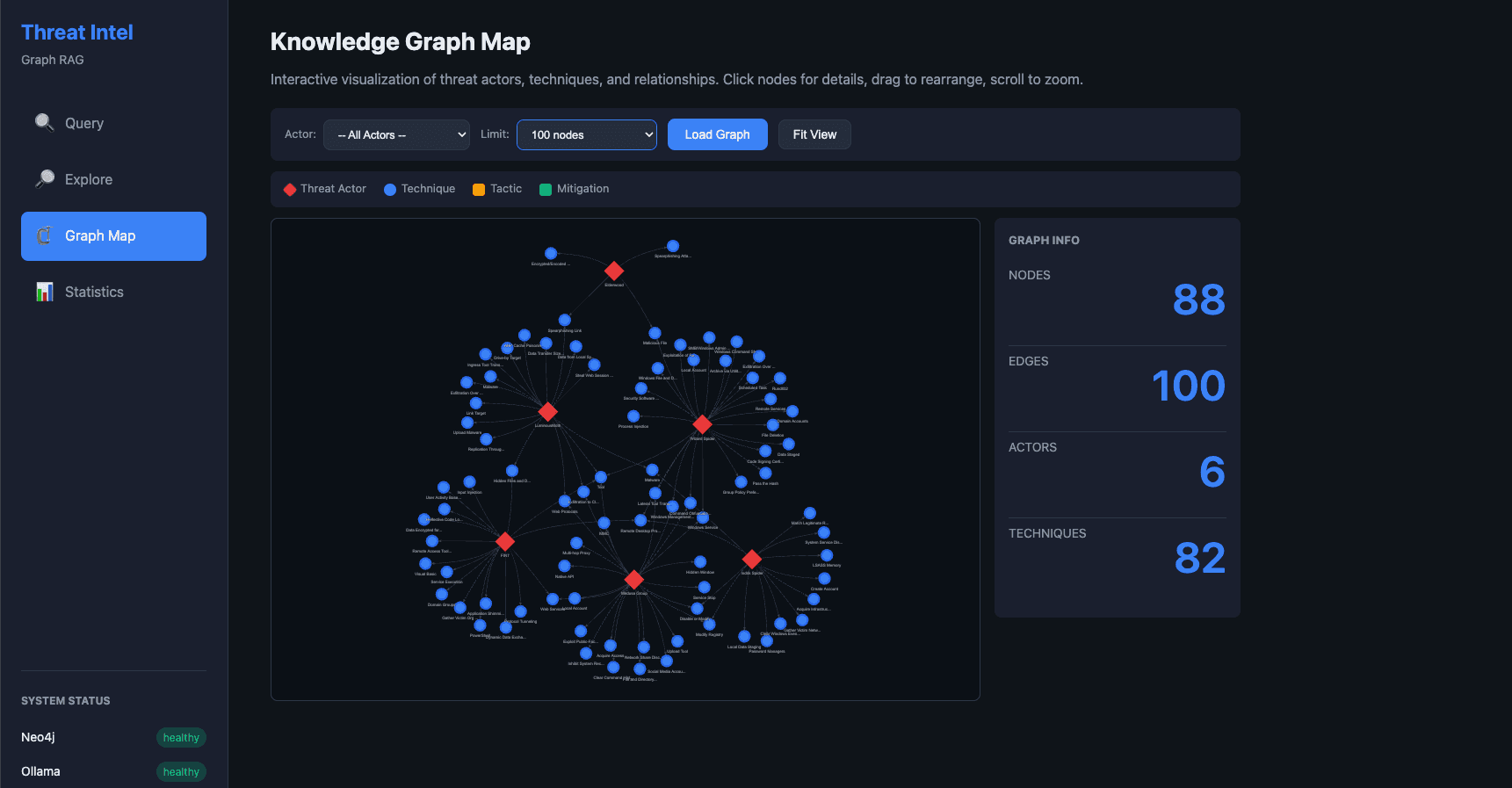
- Graph Map — Interactive vis-network visualization with actor filtering, node limits (25-200), and color-coded node types (red for actors, blue for techniques, orange for tactics, green for mitigations)
- Statistics — Chart.js dashboards showing graph composition and relationship distribution
The query interface includes a multi-stage loading overlay that shows progress through the RAG pipeline: Analyze, Extract, Query, Generate.
Deployment
The entire system runs with a single command:
make up
The Docker Compose file orchestrates all five services with health checks and dependency ordering:
services:
  neo4j:
    image: neo4j:5.15-community
    volumes:
      - neo4j_data:/data
    healthcheck:
      test: ["CMD", "neo4j", "status"]

  ollama:
    image: ollama/ollama:latest
    deploy:
      resources:
        limits:
          memory: 8G

  backend:
    build: ./backend
    depends_on:
      neo4j:
        condition: service_healthy
      ollama:
        condition: service_healthy

  frontend:
    build: ./frontend
    ports:
      - "8501:80"

  data-ingestion:
    build: ./data-ingestion
    depends_on:
      neo4j:
        condition: service_healthy
Resource requirements are modest for what the system delivers: roughly 16GB RAM total, with 8GB allocated to Ollama for the Mistral 7B model. No GPU required — everything runs on CPU.
Key design decisions
Why Ollama over cloud APIs
Privacy matters when dealing with threat intelligence. By running Mistral 7B locally through Ollama, no query data, no threat actor names, no organizational context ever leaves the machine. For security teams evaluating threats to their infrastructure, this is non-negotiable.
Why intent routing over pure Cypher generation
LLMs are not reliable Cypher generators. They hallucinate property names, invent relationship types, and produce syntactically invalid queries. By routing known intents (actor info, mitigations, attack paths) to hand-crafted, tested Cypher queries, we get reliability where it matters most. Dynamic Cypher generation is only used as a fallback for truly novel queries.
Why Neo4j over a vector database
Vector databases excel at "find me things similar to X" queries. But threat intelligence questions are mostly about relationships. "What mitigations cover techniques used by APT29 for credential access?" requires traversing specific graph paths, not finding semantically similar text chunks.
Singleton services with retry logic
Both Neo4j and Ollama connections use the singleton pattern with Tenacity-based retry logic (3 attempts, exponential backoff). This handles the reality of containerized services: Neo4j might take 30 seconds to start, and Ollama needs time to load models into memory.
@retry(
    stop=stop_after_attempt(3),
    wait=wait_exponential(multiplier=1, min=1, max=10)
)
def execute_query(self, cypher: str, params: dict = None):
    with self.driver.session() as session:
        result = session.run(cypher, params or {})
        return [record.data() for record in result]
What is next
There are several directions this project can grow:
- IOC ingestion — Pull Indicators of Compromise from AlienVault OTX for real-time threat feeds
- CVE integration — Link techniques to specific CVEs from the NVD database
- Semantic search — Add vector indexing alongside the graph for hybrid retrieval
- Query caching — Cache frequent queries for instant responses
- Authentication — Add user authentication for team deployments
- GPU support — Enable GPU acceleration for Ollama to speed up inference
Conclusion
Graph RAG is a natural fit for threat intelligence. The MITRE ATT&CK framework is already a graph — threat actors connected to techniques connected to tactics connected to mitigations. Storing this data in Neo4j and querying it with natural language through a local LLM creates a private, practical tool for security analysts.
The combination of intent-based routing for reliability, dynamic Cypher generation for flexibility, and local LLM inference for privacy makes this a practical system, not just a demo. If you work in cybersecurity and spend time navigating the ATT&CK framework, I encourage you to give it a try.
The full source code is available on my GitHub. Clone the repo, run make up, and start asking your threat intelligence questions in plain English.